Make your AI smarter
Teach your AI about your business
Your AI answers from what you write. Better words, better answers.
4 min read
How your AI knows things
When you signed up, we read your website and wrote a description of your business. Your AI answers customers using exactly what is written there. If something is missing, it cannot know it.
Change what your AI knows
- 1Click Settings in the left menu.
- 2Scroll to Business profile.
- 3Find the big box What your chatbot knows. Read it.
- 4Add anything that is missing: prices, opening hours, delivery areas, the questions customers ask most.
- 5Press Save changes. Your AI uses the new words straight away.
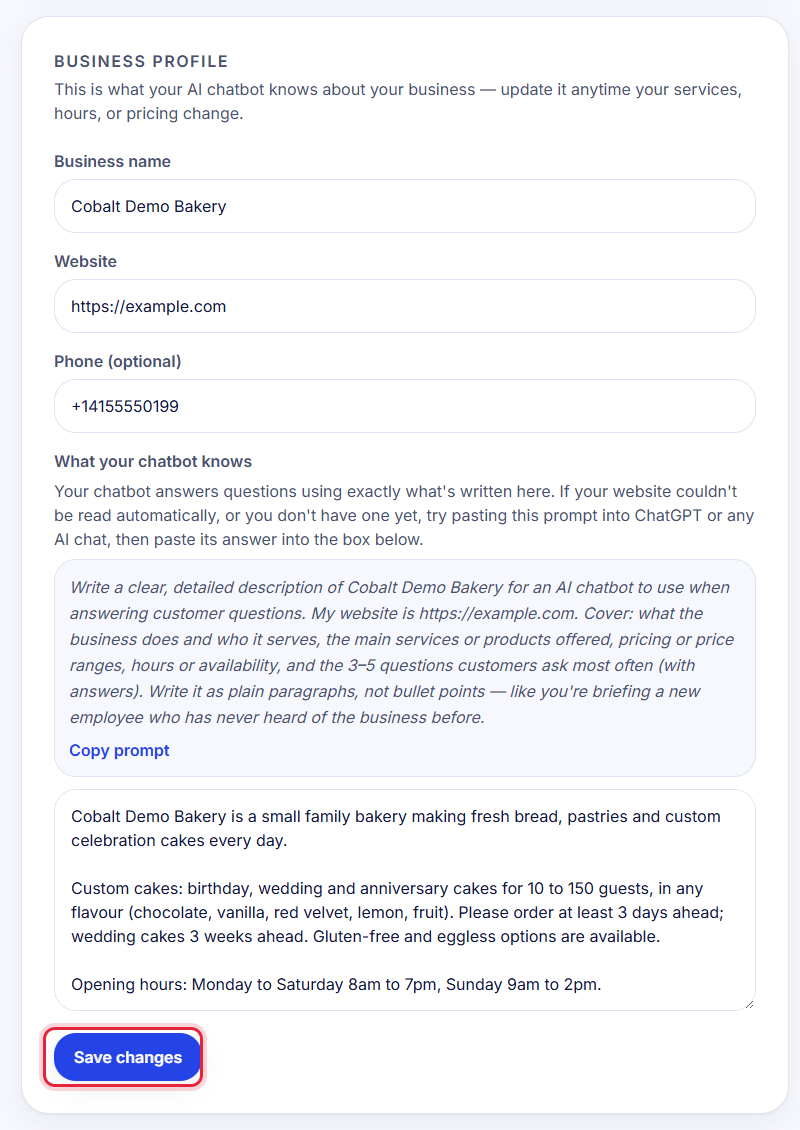
Tip: Write like you are explaining your business to a new employee on their first day. Simple sentences work best.
Ask your AI a test question
- 1On the same Settings page, find Try your chatbot.
- 2Type a question a customer might ask, like 'Do you deliver on Sundays?'
- 3Press Ask. You see the real answer your customers would get.
- 4Wrong answer? Fix the words in What your chatbot knows, save, and ask again.
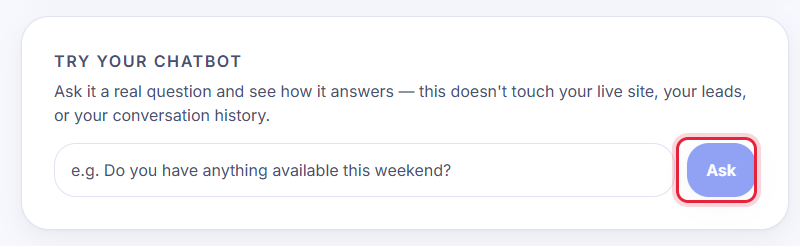
Tip: Testing here never touches your real website, your leads or your chats.
Stuck?
Ask the chat bubble in your dashboard, use Support in the left menu, or email support@chatcobalt.com. A real person reads every message.
Related guides
Chat Cobalt is a Codebold IT Solutions product.