Every day
Talk to a customer yourself (Live Chat)
Jump into any chat and reply yourself. The AI steps back.
3 min read
What it is
Live Chat shows chats happening right now. You can read along while your AI answers, and reply yourself whenever you like.
Reply to a customer
- 1Click Live Chat in the left menu.
- 2Click a chat on the left.
- 3Type your message at the bottom and press send.
- 4From now on, you are answering this customer. The AI stays quiet in this chat.
- 5Finished? Press Hand back to AI and the AI takes over again.
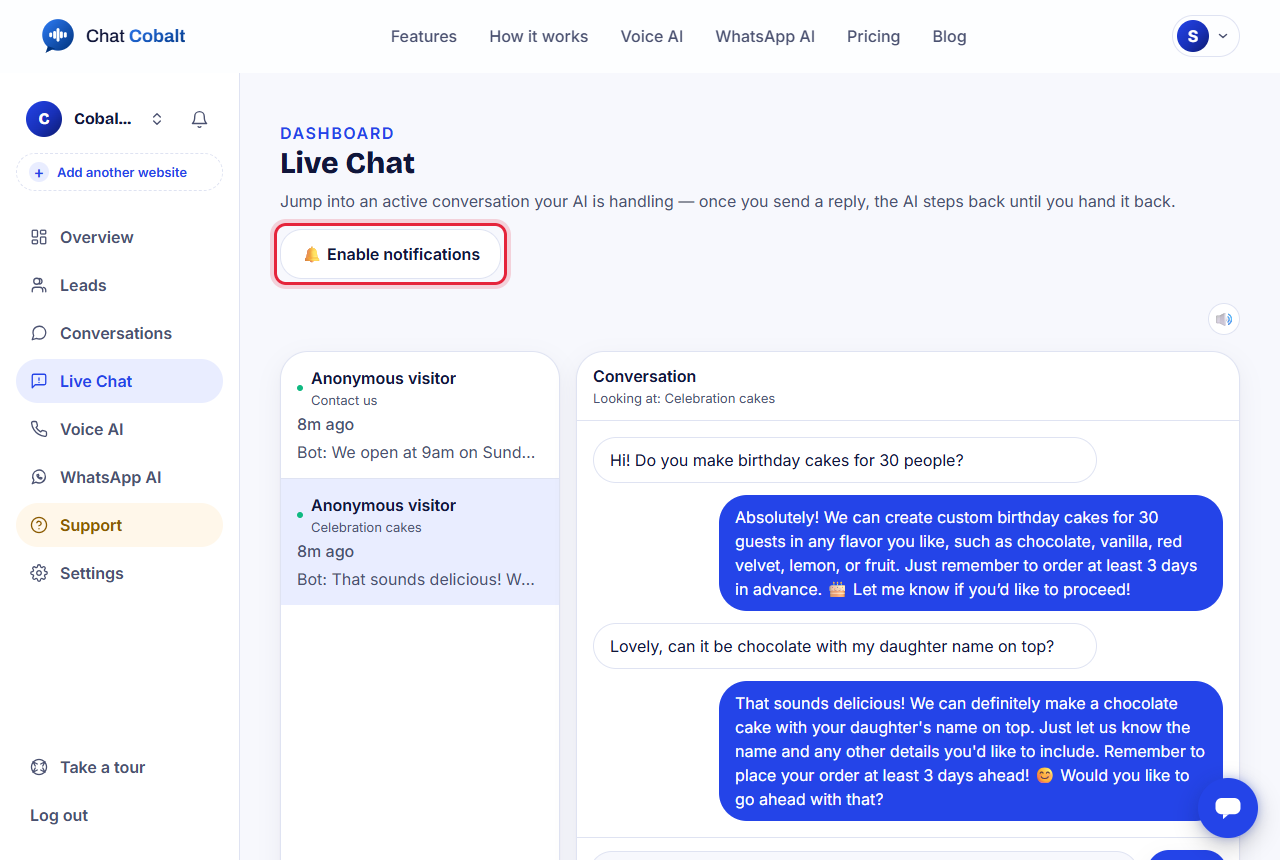
Tip: 'Looking at' shows which page of your website the customer is on, so you can open the same page.
Hear new chats
- 1Press Enable notifications at the top of Live Chat so your computer tells you about new chats.
- 2The 🔊 button turns the 'ding' sound on or off.
Tip: When a customer asks for a real person ('can I talk to someone?'), we email you straight away.
Stuck?
Ask the chat bubble in your dashboard, use Support in the left menu, or email support@chatcobalt.com. A real person reads every message.
Related guides
Chat Cobalt is a Codebold IT Solutions product.