WhatsApp, phone and app
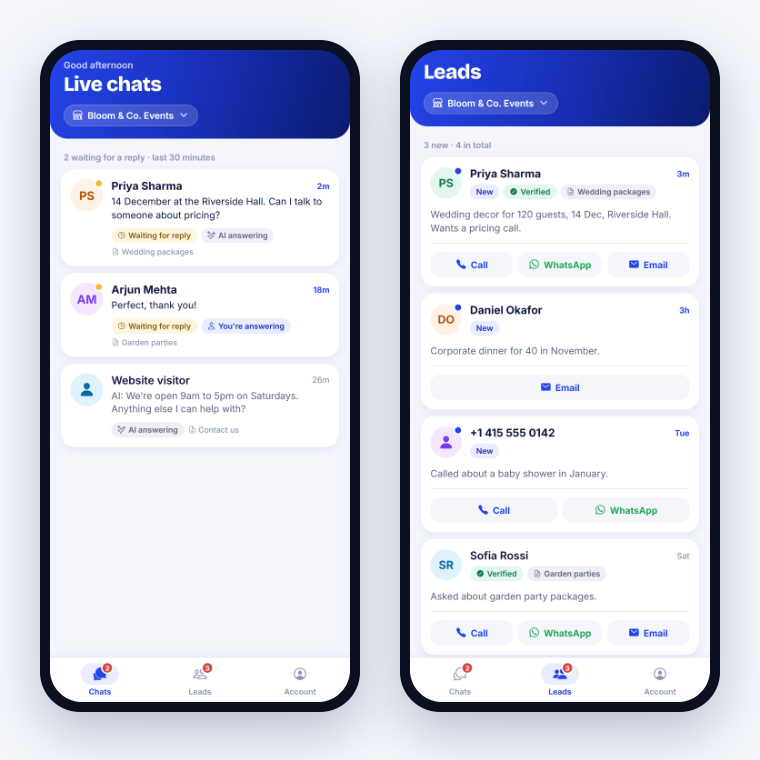
The Chat Cobalt mobile app
Your chats and leads in your pocket. No laptop needed.
2 min read
Get the app
- 1Android: open Google Play and search Chat Cobalt, or go to chatcobalt.com/app on your phone.
- 2iPhone: coming soon to the App Store.
Sign in
- 1Open the app.
- 2Type the same email and password you use for your dashboard.
- 3When it asks to send notifications, press Allow. That is how it tells you about new chats and leads.
What you can do
- 1Chats: see live chats and reply in one tap.
- 2Leads: see new leads and call, WhatsApp or email them in one tap.
- 3Account: switch between your websites and see your plan.
Tip: No alerts? On your phone go to Settings → Apps → Chat Cobalt → Notifications and turn them on.
Stuck?
Ask the chat bubble in your dashboard, use Support in the left menu, or email support@chatcobalt.com. A real person reads every message.
Related guides
Chat Cobalt is a Codebold IT Solutions product.