Your plan, billing and invoices
Free trial, adding a card, monthly or yearly, invoices and cancelling.
3 min read
Your free trial
Every new account gets 30 days free. The bar at the top of your dashboard shows how many days are left.
Add a card any time during the trial. You are only charged when the free days end.
Add your card
- 1Click Settings in the left menu (or Add billing at the top of your dashboard).
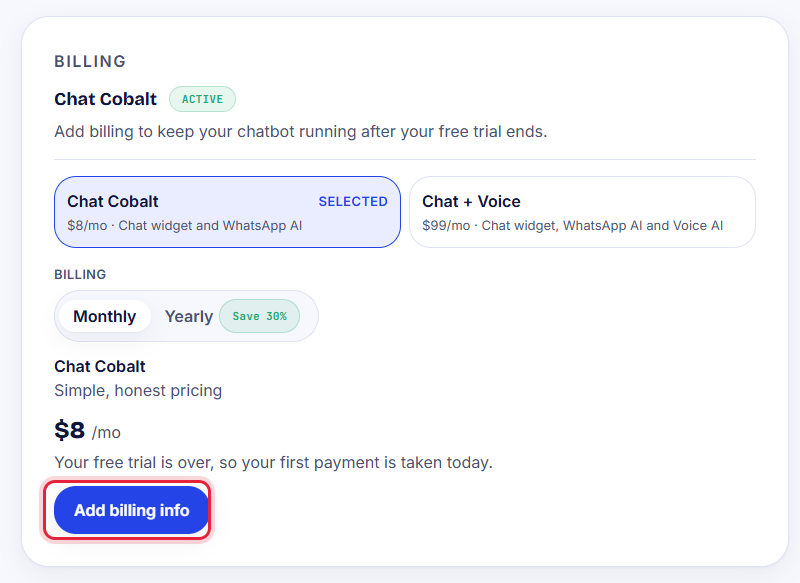
- 2In Billing, choose your plan: Chat Cobalt or Chat + Voice.
- 3Choose Monthly or Yearly (yearly costs less).
- 4Press Add billing info and type your card details in the secure window.
Tip: Prices are on the pricing page.
Invoices
Every payment sends you an invoice by email. You can download them any time from Settings → Payment history.
Cancel
Go to Settings → Billing and press Manage billing. No contract: you can cancel any time.
If something goes wrong with a payment, we email you and show a message at the top of your dashboard.
Stuck?
Ask the chat bubble in your dashboard, use Support in the left menu, or email support@chatcobalt.com. A real person reads every message.
Related guides
Chat Cobalt is a Codebold IT Solutions product.