Getting started
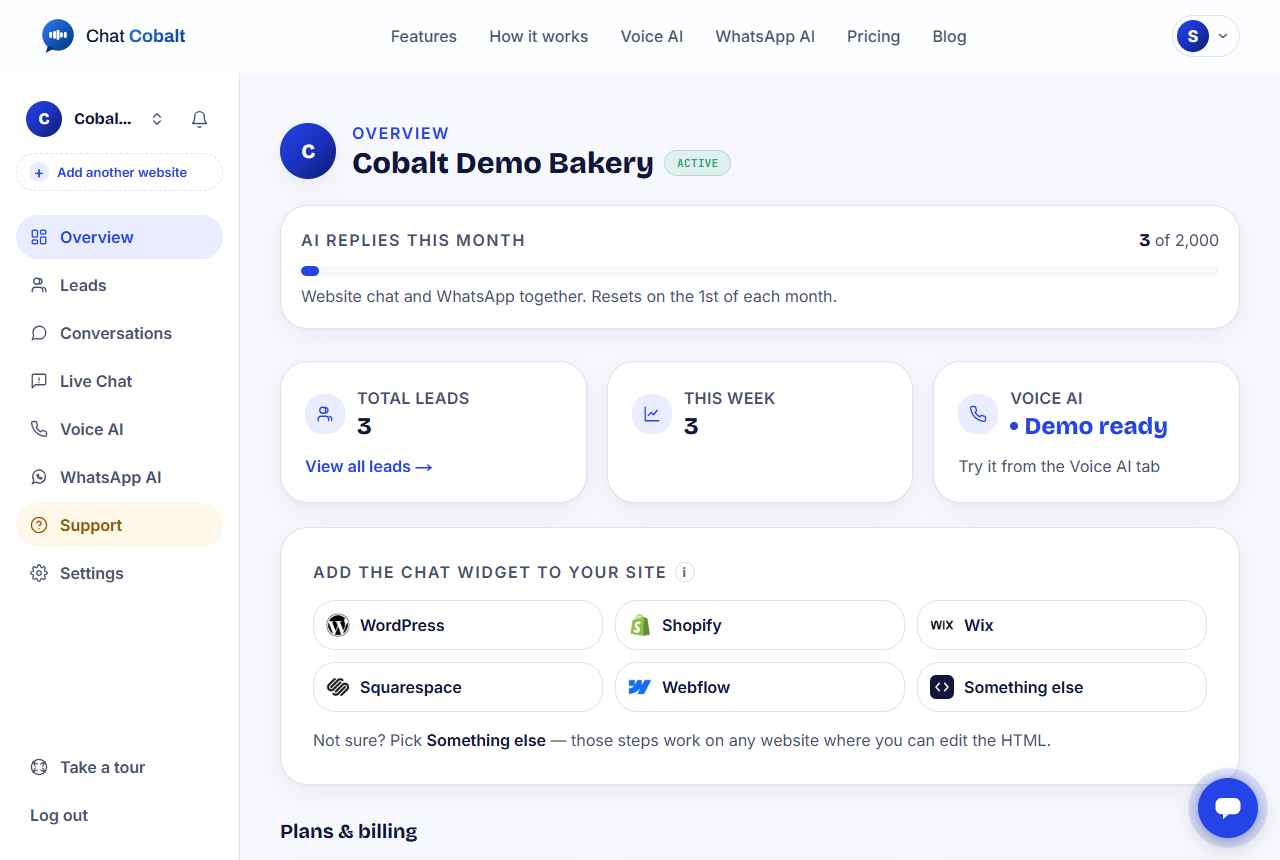
Your dashboard, explained
A quick walk around your control room.
3 min read
The menu on the left
- 1Overview: the home screen. Your numbers, your plan and how to put the chat on your website.
- 2Leads: people who left their name and number.
- 3Conversations: every chat your AI has had.
- 4Live Chat: chats happening right now. You can reply yourself.
- 5Voice AI: the AI that answers phone calls.
- 6WhatsApp AI: connect your WhatsApp number.
- 7Support: send us a message if you need help.
- 8Settings: your business details, billing and password.
Want a guided tour?
Press Take a tour at the bottom of the menu. It shows you around, one box at a time.
Tip: The little chat bubble in the bottom corner of your dashboard is our own helper. Ask it anything about your account.
Stuck?
Ask the chat bubble in your dashboard, use Support in the left menu, or email support@chatcobalt.com. A real person reads every message.
Related guides
Chat Cobalt is a Codebold IT Solutions product.